



Stop hardcoding behaviors.
AM Behavior System lets you compose, swap, and visualize them at runtime.
Caution
This project is currently in alpha and may not be stable. Please report any bugs via Github Issues.
AM Behavior System is a behavior system framework for the Unity Engine.
- Provides high reusability and flexibility through Setting, Context, Processor, and Pipeline.
- Supports visual editing directly in the Unity Editor.
- Designed to minimize GC allocations at runtime.
| Element | Description |
|---|---|
| Setting | A runtime quasi-immutable object that defines the configuration of a behavior. |
| Context | A runtime mutable object that manages the execution state of a behavior. |
| Processor | An object that handles the execution logic of a behavior using Context and Setting. |
| Pipeline | An object that manages the execution flow of a behavior. |
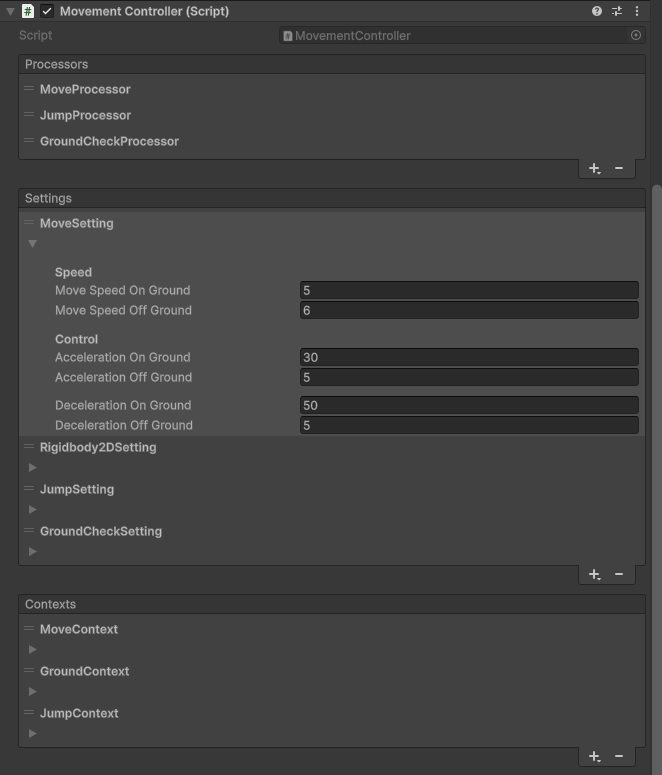
In the Unity Editor, it appears as shown above. Each Setting, Context, and Processor can be edited through their respective inspectors. For example, if you want to create a behavior that allows movement but not jumping, simply remove the JumpProcessor. AM Behavior System is designed to make it easy to compose and visualize combinations of behaviors. It provides high reusability and flexibility, allowing you to create a wide variety of behaviors with ease.
AM Behavior System can be installed via the Unity Package Manager.
Open the Unity Package Manager, click the + button in the top-left corner, and select Add package from git URL....
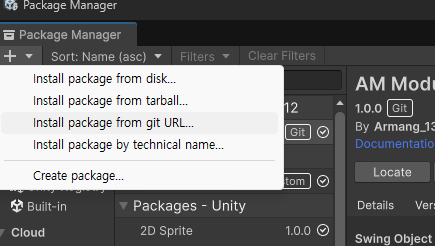
Paste https://github.com/Armangi1312/AMBehaviorSystem.git and click the Add button to begin installation.
Once installed, you can start using AM Behavior System right away.
The following samples are included:
- 1. Basic: A sample demonstrating the basic usage of AM Behavior System.
- 2. Platformer: A sample showcasing behaviors commonly found in platformer games.
- 3. FPS: A sample showcasing behaviors commonly found in FPS games.
For additional usage details and in-depth documentation, please refer to the Documentation.