Tech-Expo is a full-stack CRM application built as a modular monolith, showcasing scalable backend architecture, secure design, and production-ready practices.





- Overview
- Features
- Tech Stack
- Architecture
- Setup and Usage
- Live Demo
- Future Features
- License
- Acknowledgements
Tech-Expo is a full-stack CRM-style application showcasing secure microservice architecture, modern DevOps practices, and production-grade observability.
I built this project to simulate how modern businesses manage and present customer data at scale, while serving as a capstone project to highlight enterprise-level engineering skills, technical ability, and attention to detail in managing a complex polished mono-repo.
It includes core CRM capabilities like customer management, secure authentication, real-time dashboard, while demonstrating modern DevOps and observability practices such as TLS certification, encrypted credential protocol, pre-commit scans, and more.
🎥 Watch Project Overview Video [30s]
Frontend
- Framework: React, with Redux, React-Router, React-Hook-Form
- UI: drag-drop Kanban board, calendar, filter-sort-paginate TanStack tables, quote PDF, user comment system, tool-tips
- UX: Responsive design, ARIA components and accessibility concern, sidebar and transition animations
- Auth: sign-up system, password strength check, persistent login (access/refresh token), TLS certification
- State: Redux, Apollo Client
- Optimization: code-splitting, lazy-loading, brotli compression, and Webpack build optimizations
Backend
- Framework: ExpressJS with GraphQL
- API: REST endpoints, GraphQL queries/mutations
- Verification: account verification, confirmation, and expiring token via nodemailer
- Authentication: password reset/update, JWT with secure cookies, access/refresh token system
- Authorization: role-based access, route protection, resource ownership rules
- Database integration: PostgreSQL, MongoDB, Redis
- Schemas: migration, development DB seeding, and type-safe ORM (Drizzle) schema design
- Error Handling: graceful termination, global error handling, logging with Pino, and production logging with Rollbar
- Security: secure Docker secrets and .env, audit trail, Argon2 password encryption, rate limiting, input validation and sanitization, helmet
Infrastructure & DevOps
- Dockerfile: custom brotli-enabled Nginx image, multi-stage and PNPM friendly layer caching
- Compose: multi-environment (dev, prod, swarm) multi-service orchestration
- Secrets: in-place secret encrypt/decrypt with Mozilla SOPS, scoped permissions/ownership of TLS keys
- Persistence: named database volumes, tmpfs for certification files (for dev)
- Scripting: processing permissions/ownership of TLS files (for dev), custom init/healthcheck, docker init helper
- Scalability: Docker swarm compliant
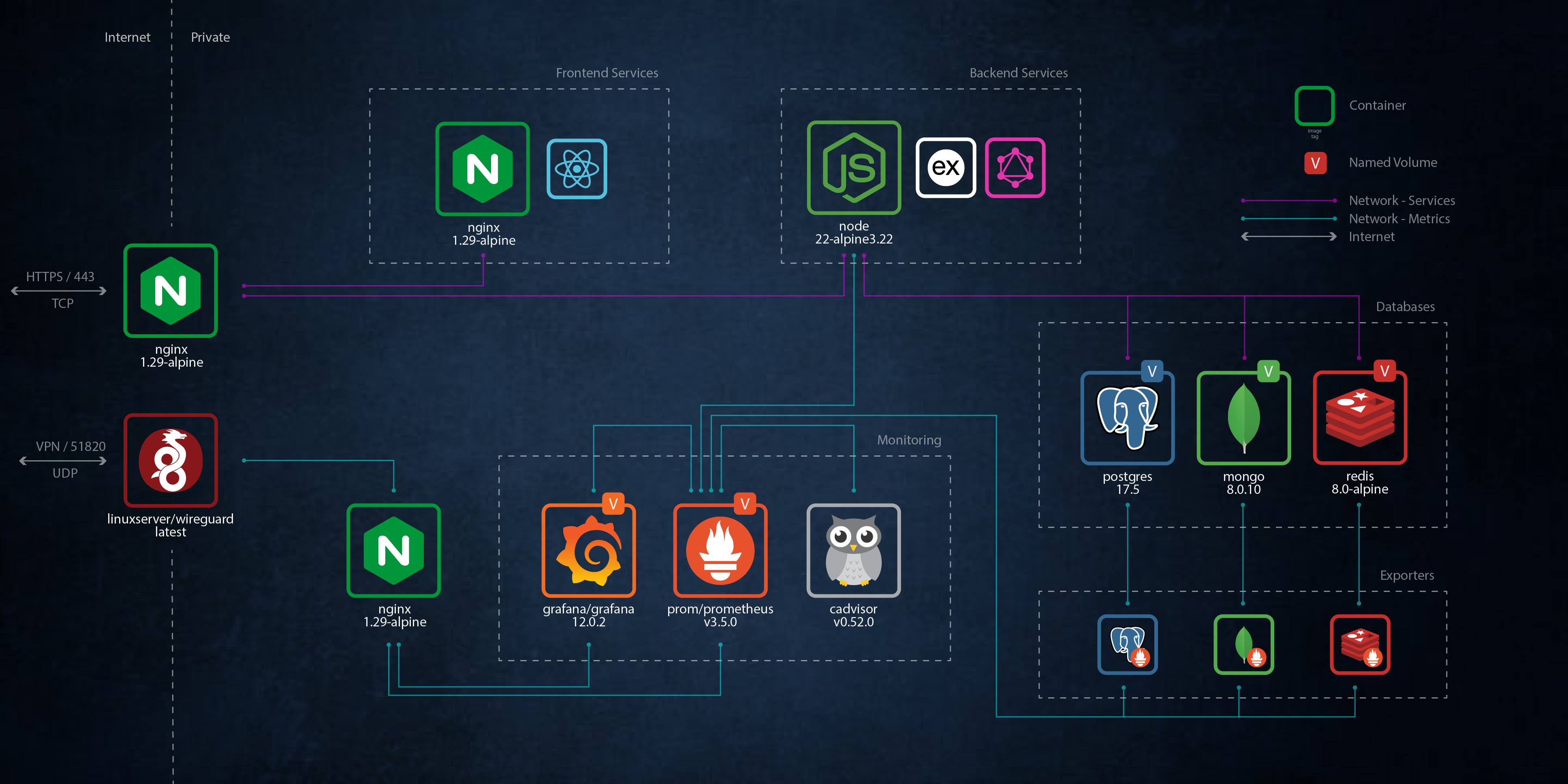
- Security: public-facing reverse Nginx proxy, secure internal networking, Wireguard VPN for metrics access
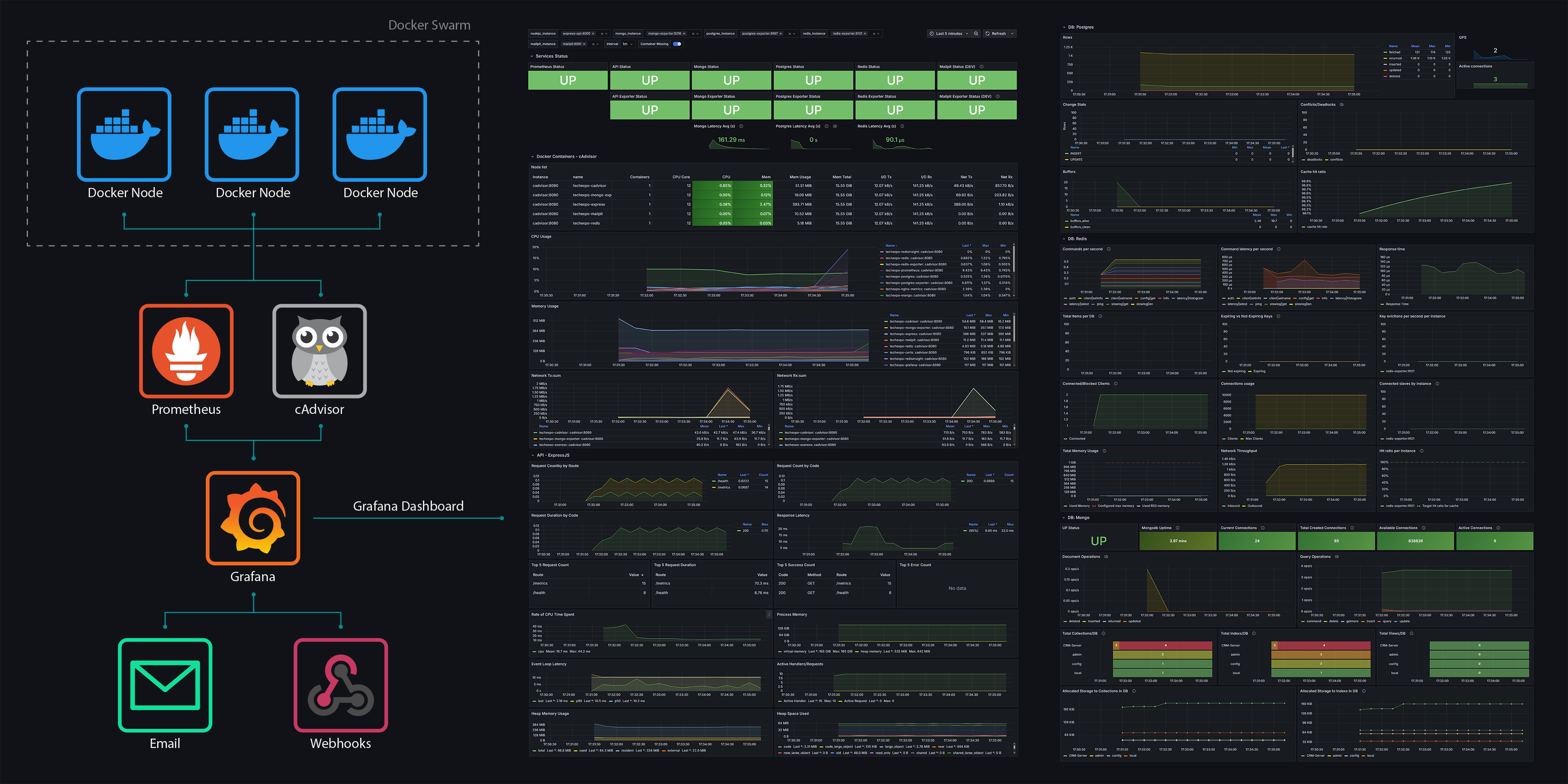
- Monitoring: scraping of expressjs and databases with Prometheus, core metrics dashboard in Grafana
Monitoring
- Prometheus: metrics exposed from expressJS service, postgreSQL, mongo, redis
- Grafana: unified dashboard with UP status overview, docker container metrics (cAdvisor), annotations, alerts
- Dashboard: dedicated rows for expressJS and each database; latency, query ops, memory use, requests/errors
- Alerts: Grafana email alerts for databases offline, high-rate 5xx server errors, redis max-memory
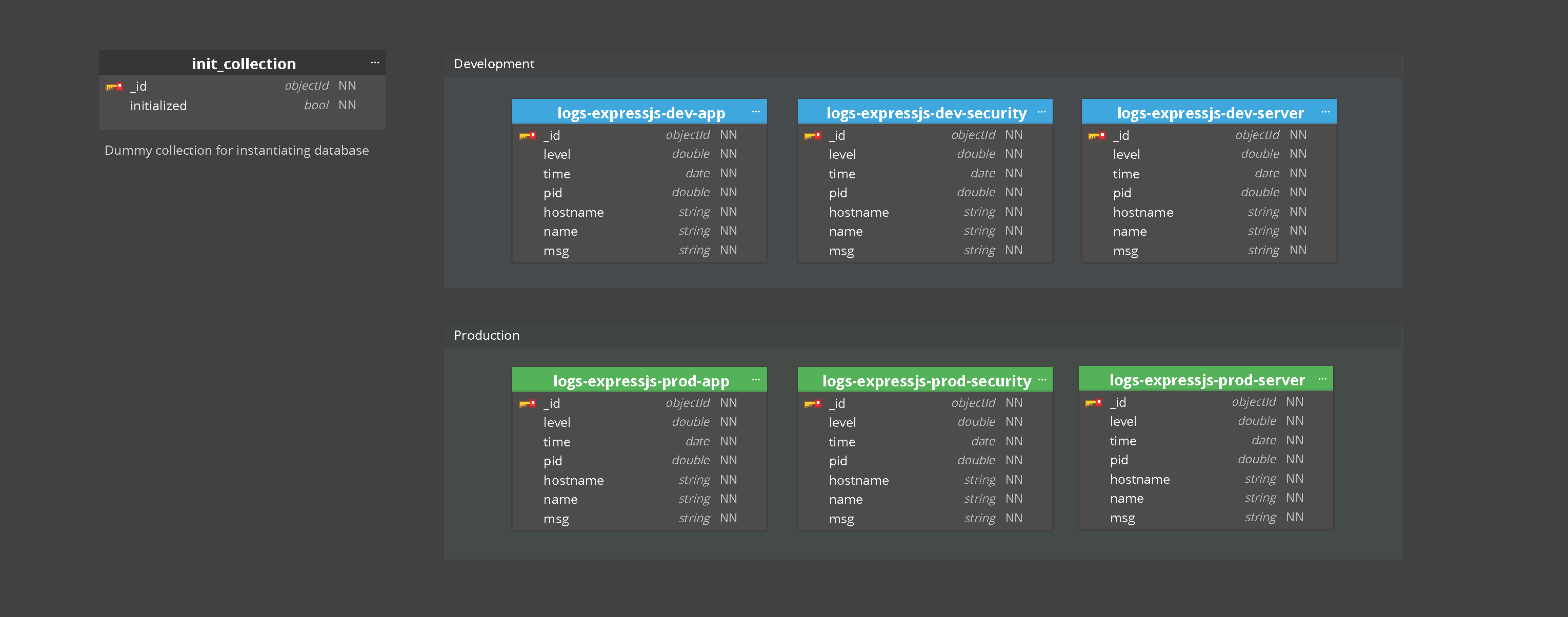
- Logging: Pino logger from expressJS to MongoDB, Rollbar real-time monitoring
- Health checks: docker service health checks for auto-restart resilience
- Security: dedicated Docker network for metrics, TLS protected, accessible through WireGuard VPN
Repo Management / Developer Experience
- PNPM Monorepo: centralized configuration store (/packages), repo and app targeted scripts
- Presentation: EditorConfig, Prettier, Eslint, Stylelint, and CommitLint conventions/styles alignment
- Git: CommitLint enforcing commit conventions, Husky running MegaLinter linting pre-commit
- Actions: github workflows for linting, testing, and dependency checks
- Testing: Vitest setup for unit/integration tests, Cypress for E2E
- Security: full SecretLint pre-commit check, MegaLinter local security scan
- Logging: dedicated logs folder for pre-commit megalinter report, eslint, stylelint, and secretlint scan reports
- Documentation: comprehensive well-structured README files
Repository Management




Languages




Frontend







Backend





Infrastructure







Security




Testing





Tools







Development Environment




Infrastructure Diagram
PostgreSQL
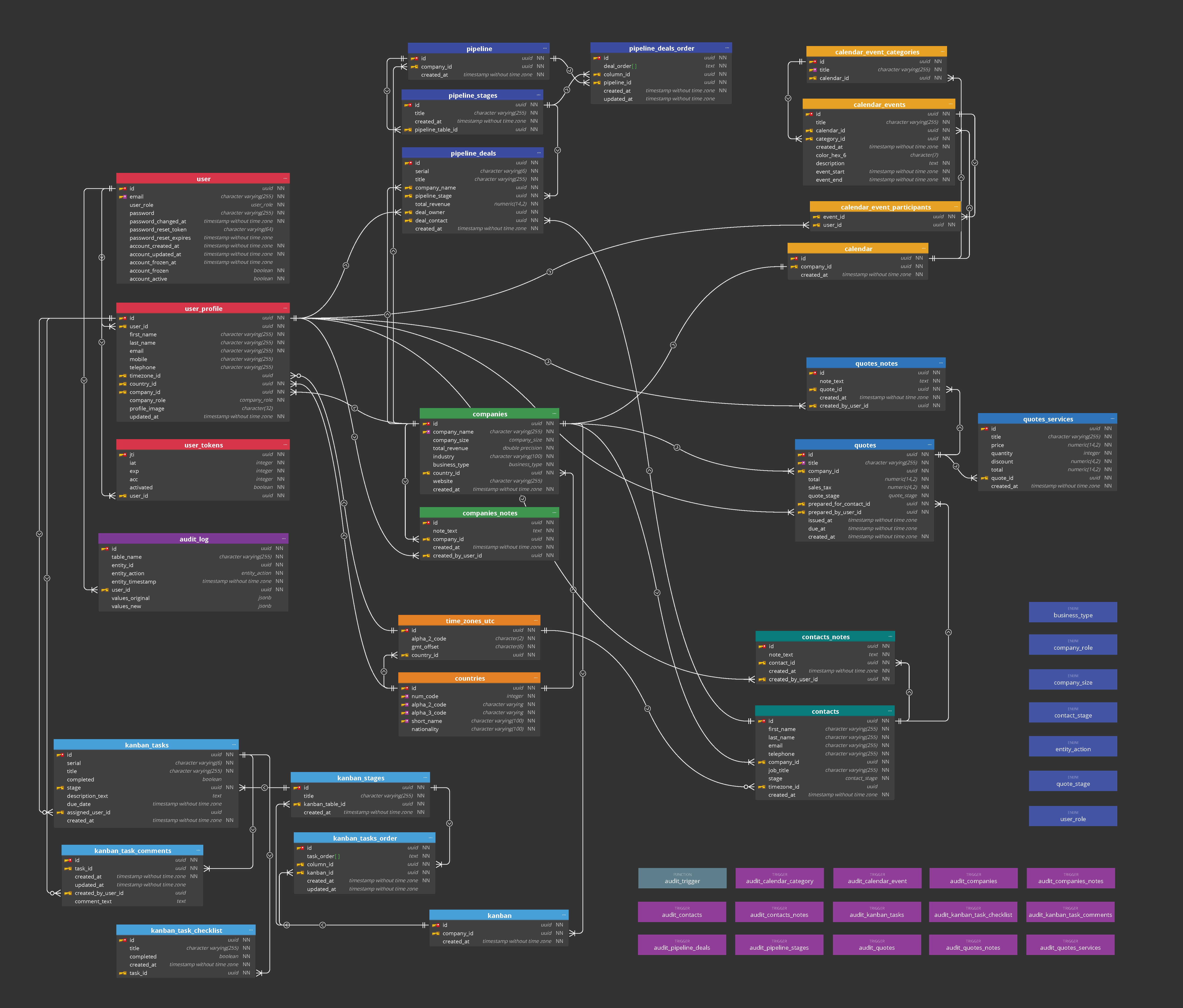
Explore the components of the postgres architecture through this interactive schema diagram: Interactive Postgres Diagram
GraphQL
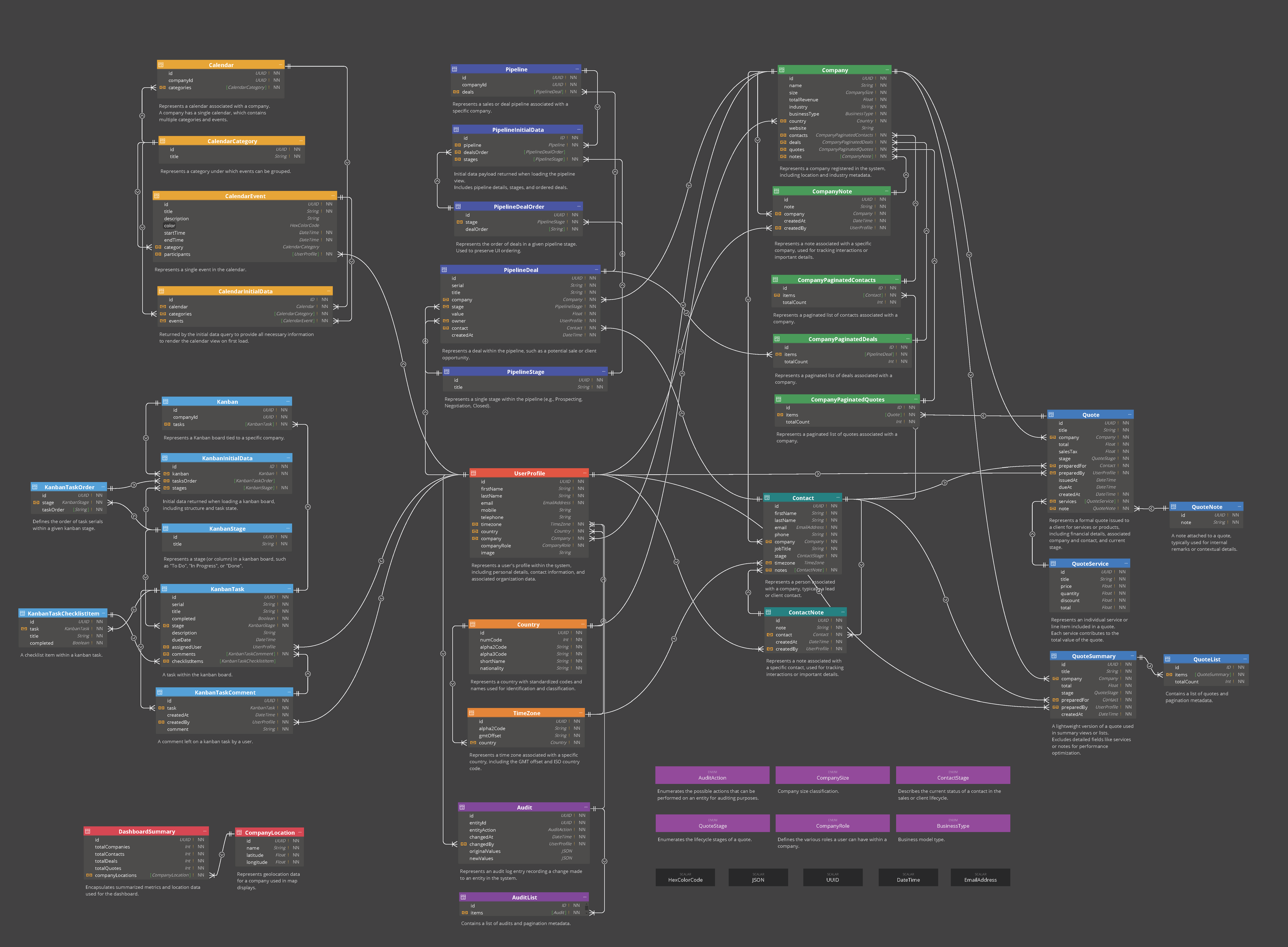
Explore the components of the graphql architecture through this interactive schema diagram: Interactive GraphQL Diagram
Mongo
Explore the components of the mongo architecture through this interactive schema diagram: Interactive Mongo Diagram
Metrics Collection
./
├─ .github/                           # github workflows
├─ .husky/                            # commit workflows
├─ .vscode/                           # vscode settings
├─ apps/                              # mono-repo applications
│  └─ crm/
│     ├─ client/                      # service; React
│     ├─ server/                      # service; ExpressJS
│     ├─ docker/
│     │  ├─ certs/                    # TLS certification
│     │  ├─ grafana/                  # service; monitoring
│     │  └─ ...more services
│     └─ shared/                      # shared types
├─ logs/
├─ node_modules/
├─ packages/                          # mono-repo configurations
├─ scripts/                           # root package.json scripts
├─ package.json
├─ .mega-linter.lint.yaml             # pre-commit linting
├─ .mega-linter.security.yaml         # manual security scan
└─ ...configuration filesThe application is designed to run in a Docker Swarm environment. For local use, a production-like setup is provided via docker-compose.prod.yml, which does not require Docker Swarm.
For prerequisite certification files and detailed instructions, see the Docker README.md.
- Install prerequisite dependencies (see below):
DockerMozilla SOPS - Download or Clone repository
- Run quickstart helper script;
- generates required files: .env, .secret, TLS certification
- output
.secret.credentialsunencrypted secrets reference for quick-access - automatically initializes
docker-compose.prod.yml
git clone https://github.com/SStranks/tech-expo
cd tech-expo/apps/crm/docker
./quickstart.prod.sh- Version: 28 or higher (Rootless recommended for security, but not strict requirement)
- Platform: Linux
- Installation: Docker
- Used for file encryption and secret management
- Required to run the supplied Docker setup as-is
- Alternative tools can be used, but Docker secret paths and initialization scripts (
docker.sh) must be updated accordingly - Installation: Mozilla SOPS
- Version: 10.26.0 as defined in
package.json - Install via:
curl -fsSL https://get.pnpm.io/install.sh | env PNPM_VERSION=<10.26.0> sh -- For further information and alternative installation options: PNPM
- Version: 22 as defined in
package.json - Recommended: Use NVM to manage multiple Node versions
- Installation: NVM and Node
- Version: 9
- Warning: Large image (11Gb)
- Used for pre-commit linting and security scans
- Installation:
docker pull oxsecurity/megalinter:v9
Please refer to the respective readme files for details on debugging configuration using VSCode:
For tool specific configuration refer to the respective readme sections:
While this capstone demonstrates the foundation of an expo management system, I’ve identified several directions for future development. Some are geared toward expanding the product for a real-world use case, while others focus on engineering practices that reflect progression from junior to senior software engineer:
Future Features List
- A landing page with a Three.js virtual expo hall where attendees can navigate booths and talks
- WebSocket-powered chat, Q&A, and live booth updates for collaborative engagement.
- Stripe integration for ticket sales, booth reservations, and premium sessions.
- Dashboards for tracking booth visits, popular sessions, and attendee engagement.
- Support for multiple languages, time zones, and currencies.
- Terraform for reproducible cloud environments.
- Splitting monolith into services (e.g., payments, notifications, scheduling) to improve scalability.
- Expanding tracing and log aggregation with OpenTelemetry/ELK stack.
- Offline schedules, push notifications, and home-screen installation for attendees on the go.
Licensed under the MIT License – see LICENSE for details.
A special thanks to the following platforms, communities and services that supported my learning journey on this project.