


Background geolocation for React Native & Expo that keeps tracking when the app is backgrounded, killed, force-quit, or rebooted. iOS & Android, New Architecture (TurboModule), with a native offline queue and HTTP uploader — no JavaScript runs in the background.
Fully functional in DEBUG builds — no license required. Try before you buy. Every feature works unlicensed in debug builds, so you can evaluate the engine on a real device route before paying for anything. A key is only needed for release builds.
- It survives. iOS uses the modern session engine (
CLBackgroundActivitySessionCLLocationUpdate.liveUpdates) with a wake region and significant-change monitoring as backup; Android uses a foreground service with boot + task-removal restart. Device-verified: force-quit mid-drive resumes in ~1 s, a reboot relaunches tracking with no user interaction, an overnight OS eviction wakes on the morning departure.
- Battery-sane. Motion state machine with activity recognition, adaptive
speed-elastic
distanceFilter, and a coarse keep-alive while parked — GPS sleeps when the device does. - Uploads from native code. Locations go into a SQLite queue and are POSTed by the engine itself, with batching, exponential backoff, JWT auth + token refresh, and poison-record handling. Offline points survive app death and are drained later; JS never has to be awake.
- Clean fixes. Kalman smoothing, accuracy gate, and teleport rejection before a point ever reaches your server.
- Familiar API. Transistorsoft-shaped (
ready/start/onLocation/…), so existing integrations and docs knowledge carry over. - Geofences. ENTER/EXIT/DWELL with proximity slicing, well past the OS region limits, riding the same offline upload queue.
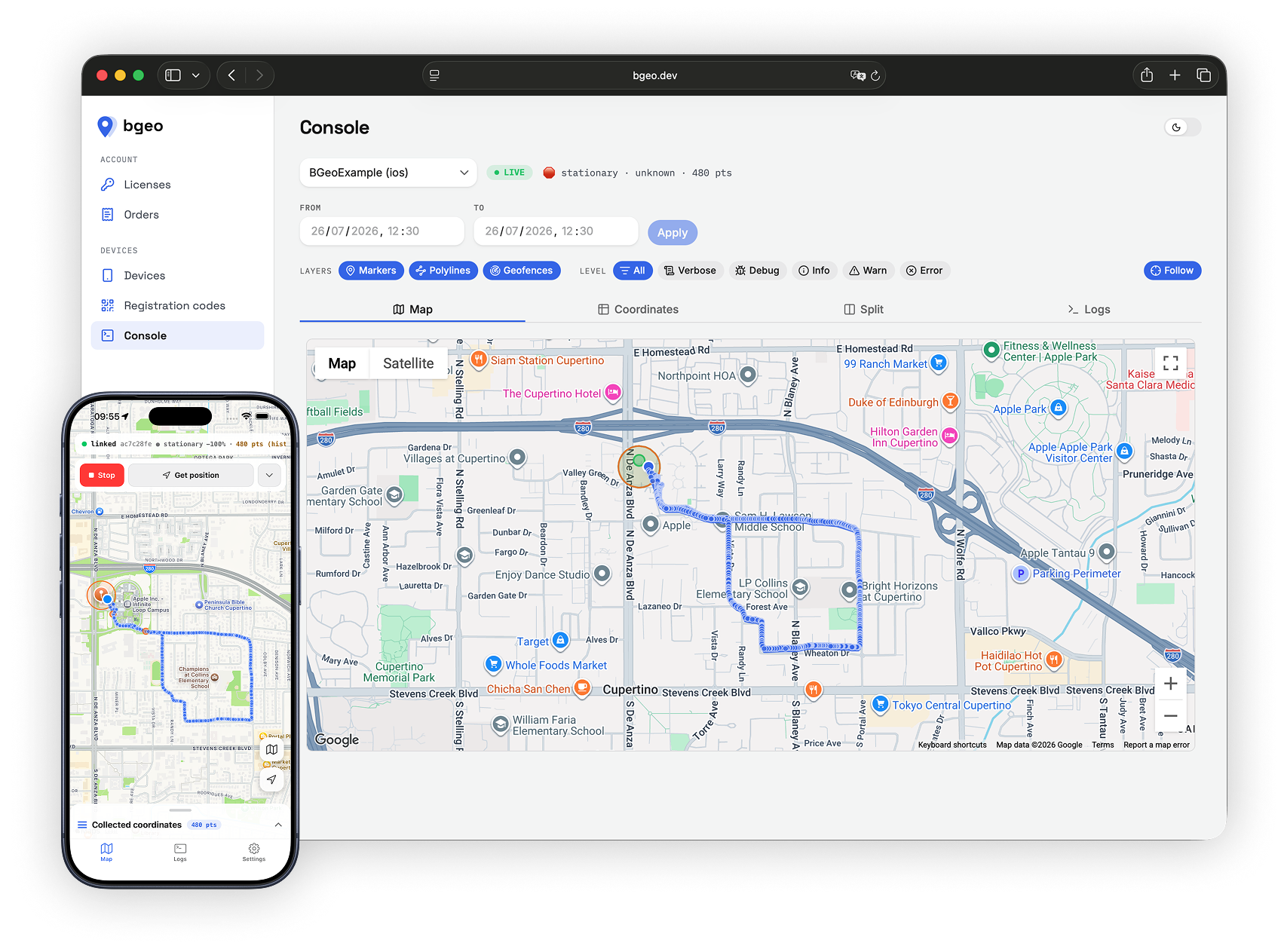
Every install can be linked to the console at bgeo.dev — manage licenses and registration codes, then watch a device live: map with route polyline and geofences, raw coordinates, and a split view.
And because the logger is native, the console shows what the engine did — not what your JS saw. Motion transitions, session start/stop, permission changes, fix summaries, HTTP results — streamed off the device and filterable by level:
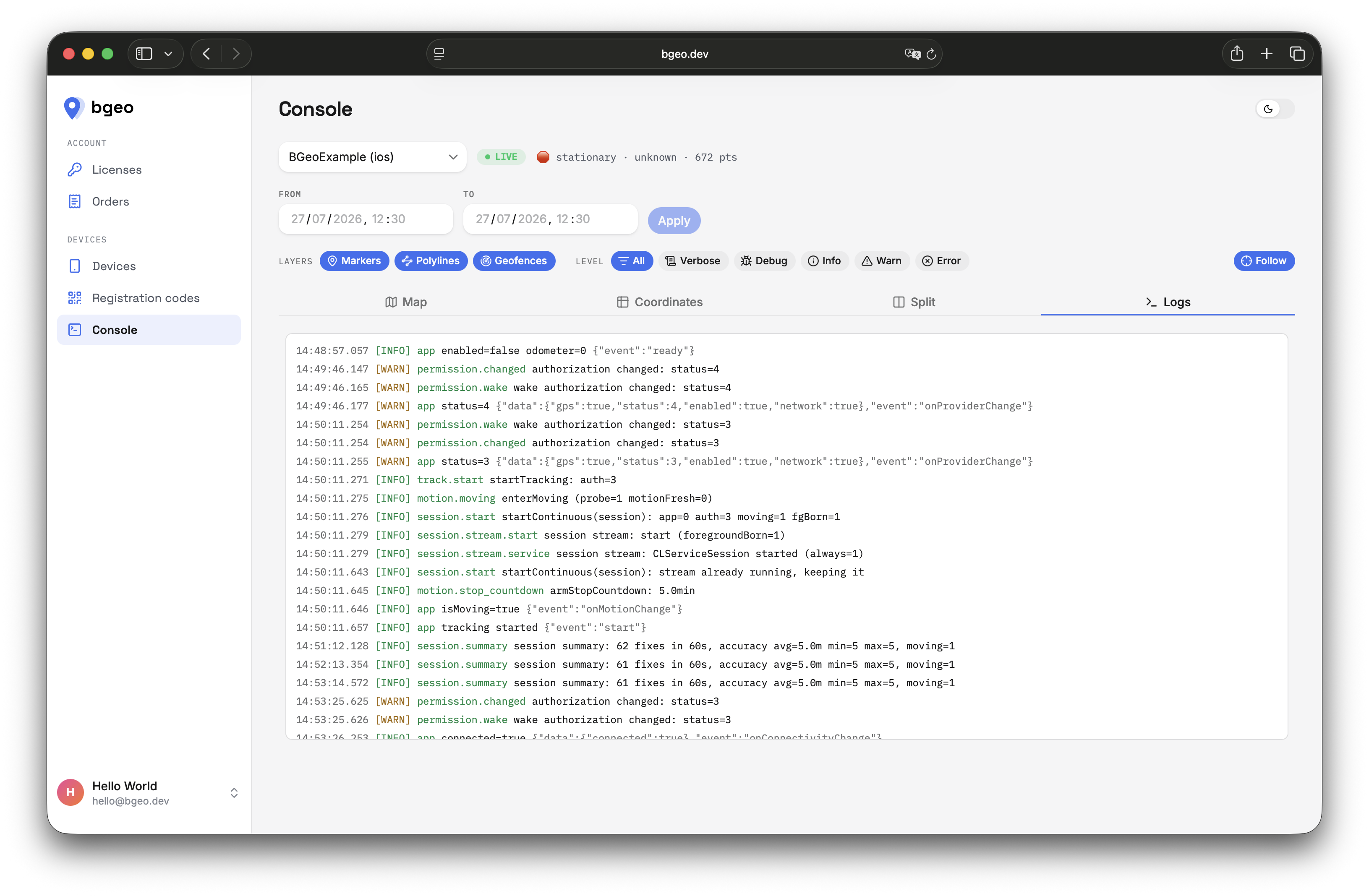
That is the difference between guessing why a background track has a gap and reading the line where the engine says so. Logs are buffered in SQLite and uploaded on the same schedule as locations, so a killed app still reports.
Linking is a registration code plus setConfig — see
example/src/deviceLink.ts. Your own server stays
the default target; the console is opt-in.
- React Native ≥ 0.76 (New Architecture only)
- iOS ≥ 15.5, Android minSdk 24
- Expo SDK 54+ via the bundled config plugin (development build — not Expo Go)
npm install @dc-bgeo/react-native-background-geolocationThe closed engine ships as an AAR in a local Maven repo inside this package.
Add it to your project's android/build.gradle:
allprojects {
  repositories {
    maven { url("$rootDir/../node_modules/@dc-bgeo/react-native-background-geolocation/android/libs") }
  }
}
Declare background location yourself (Google Play requires the app to own this
declaration + the Play Console disclosure) in android/app/src/main/AndroidManifest.xml:
<uses-permission android:name="android.permission.ACCESS_BACKGROUND_LOCATION" />cd ios && pod installAdd NSLocationAlwaysAndWhenInUseUsageDescription, NSMotionUsageDescription,
and the location background mode (UIBackgroundModes) to your Info.plist.
Everything above is written for you by the bundled config plugin — add it to
app.json and run npx expo prebuild:
{
  "expo": {
    "plugins": [
      ["@dc-bgeo/react-native-background-geolocation", {
        "licenseKey": "BGEO1….YOUR_KEY",
        "locationAlwaysAndWhenInUsePermission": "Keep tracking your route while the app is closed.",
        "motionPermission": "Detect when you start and stop moving.",
        "fullAccuracyPurpose": "Precise location is required to track your route accurately."
      }]
    ]
  }
}| Option | Default | Effect |
|---|---|---|
licenseKey |
— | BGeoLicense (Info.plist) + com.bgeo.license meta-data (manifest) |
locationWhenInUsePermission |
generic string | NSLocationWhenInUseUsageDescription |
locationAlwaysAndWhenInUsePermission |
generic string | NSLocationAlwaysAndWhenInUseUsageDescription |
motionPermission |
generic string | NSMotionUsageDescription |
fullAccuracyPurpose |
unset | DeliverFullAccuracy — required for requestTemporaryFullAccuracy() |
isIosBackgroundFetchEnabled |
false |
adds fetch to UIBackgroundModes (location is always added) |
isAndroidBackgroundLocationEnabled |
true |
ACCESS_BACKGROUND_LOCATION |
The plugin also points the generated android/build.gradle at the engine's local
Maven repo. Every other Android permission, service and receiver merges in from the
engine AAR — nothing else to declare.
Requires Expo SDK 54+ and a development build: this is custom native code, so
Expo Go cannot run it. Use npx expo run:ios / npx expo run:android, or
eas build --profile development.
Android headless tasks need registerHeadlessTask to run at module scope of the
entry file, before React renders. With Expo Router, point main at your own entry:
// index.js  →  "main": "index.js" in package.json
import BackgroundGeolocation from '@dc-bgeo/react-native-background-geolocation';

BackgroundGeolocation.registerHeadlessTask(async (event) => {
  console.log('[headless]', event.name, event.params);
});

import 'expo-router/entry';import BackgroundGeolocation from '@dc-bgeo/react-native-background-geolocation';
const sub = BackgroundGeolocation.onLocation(location => {
console.log('[location]', location.coords);
});
// License key goes in the manifest / Info.plist (see License keys), not here.
await BackgroundGeolocation.ready({
distanceFilter: 10,
stopTimeout: 5,
url: 'https://your-server.example/locations',
autoSync: true,
});
await BackgroundGeolocation.requestPermission();
await BackgroundGeolocation.start();That is the whole integration. Debug builds run without a license key — the SDK is fully functional in DEBUG, no key, no trial period, no feature gates.
A runnable console app lives in example/ — settings screen for
every config key, live map, log viewer, geofence editor.
A production key is bound to your applicationId + signing certificate
(Android) / bundle id + Team ID (iOS). Register the Play App Signing
certificate. In a release build an invalid/expired/mismatched key makes
ready() / start() reject with LICENSE_MISSING | LICENSE_INVALID | LICENSE_EXPIRED | LICENSE_APP_MISMATCH; debuggable builds and the iOS simulator
never produce these codes — they run unlicensed (evaluation) whatever the key
state, so a key bound to your release signing cert can't block development.
Since v0.4.12 a rejected release build also shows a persistent red banner at
the bottom of the screen with the error code and app id, so a bad key can't
slip through release testing unnoticed.
Set the key in the manifest — the same mechanism for RN/native/Flutter, read at launch before JS runs (there is no config option):
<!-- android/app/src/main/AndroidManifest.xml -->
<meta-data android:name="com.bgeo.license" android:value="BGEO1....YOUR_KEY" />
<!-- ios Info.plist -->
<key>BGeoLicense</key><string>BGEO1....YOUR_KEY</string>Transistorsoft-shaped:
- Lifecycle —
ready,setConfig,start,stop,getState,changePace - Position —
getCurrentPosition,watchPosition,stopWatchPosition,getOdometer,setOdometer,resetOdometer - Queue / HTTP —
sync,getLocations,getCount,insertLocation,destroyLocation,destroyLocations,getAuthState - Geofences —
addGeofence(s),removeGeofence(s),getGeofences,geofenceExists - Permissions / device —
requestPermission,requestTemporaryFullAccuracy,getProviderState,isPowerSaveMode - Logger —
logger.error/warn/info/debug/verbose,getLog,destroyLog,uploadLog - Events —
onLocation,onMotionChange,onHeartbeat,onProviderChange,onGeofence,onGeofencesChange,onHttp,onConnectivityChange,onPowerSaveChange,onAuthorization - Android headless —
registerHeadlessTask
See src/types.ts for the full Config reference.
The bridge (everything in src, lib, android/src, the podspec and gradle
glue) is MIT — see LICENSE.
The precompiled engine (ios/BGeoCore.xcframework, the dev.bgeo:bgeo-android
AAR) is proprietary and requires a license key in release builds — see
LICENSE-BINARY.md. Debug builds and the iOS simulator
run without a key.