


A high-performance React JSON diff viewer for large, real-world JSON data.
Built to handle tens of thousands of lines without freezing the UI, it uses virtualized rendering to stay fast and responsive even in production-scale scenarios.
Powered by json-diff-kit, it supports virtual scrolling, collapsed unchanged regions, review/merge mode, advanced comparison options, search, dual minimaps, and customizable theming.
Most JSON diff viewers work well for small examples, but start breaking down in real-world scenarios:
- Large JSON files cause the UI to freeze or crash
- Rendering thousands of DOM nodes makes scrolling unusable
- Array changes are hard to reason about without object-level comparison
- It’s difficult to understand the impact of changes beyond raw diffs
virtual-react-json-diff was built to solve these problems.
It is designed for internal dashboards and developer tools that need to compare large, deeply nested JSON objects efficiently and interactively.
virtual-react-json-diff is designed for scenarios where traditional diff viewers become unusable due to size or complexity.
- Virtualized rendering powered by
react-window - Smooth scrolling and interaction even with very large diffs
- Collapse unchanged regions by default so you focus on real changes — expand/collapse still works with virtualization (only visible rows stay in the DOM)
- Dual minimap with visual change indicators
- Jump directly to changes using search highlighting
- Optional single minimap for compact layouts
- Programmatic navigation API via
ref(nextChange,scrollToPath,expandPath/expandAll, …) - Keyboard shortcuts for jumping between change blocks
- Turn on review mode to accept or reject each change block (hunk), similar to a selective merge
- Decisions apply to whole blocks (not single lines), so nested JSON stays syntactically valid
- Get a live merged JSON object as you accept/reject — useful for config reviews, migration tools, and admin UIs
- Optional custom styles for accepted / rejected / pending rows
- Line count statistics for added, removed, and modified lines
- Object-level statistics when using compare-key array diffs
- Quickly assess how big or risky a change really is
- Ignore specific keys or paths anywhere in the JSON tree
- Multiple comparison strategies (
strict,loose,type-aware) - Fine-grained control over how values are considered equal
- Custom class names for theming
- Inline diff customization
- Access raw diff data for advanced use cases
👉 Try it now - Interactive demo with live examples
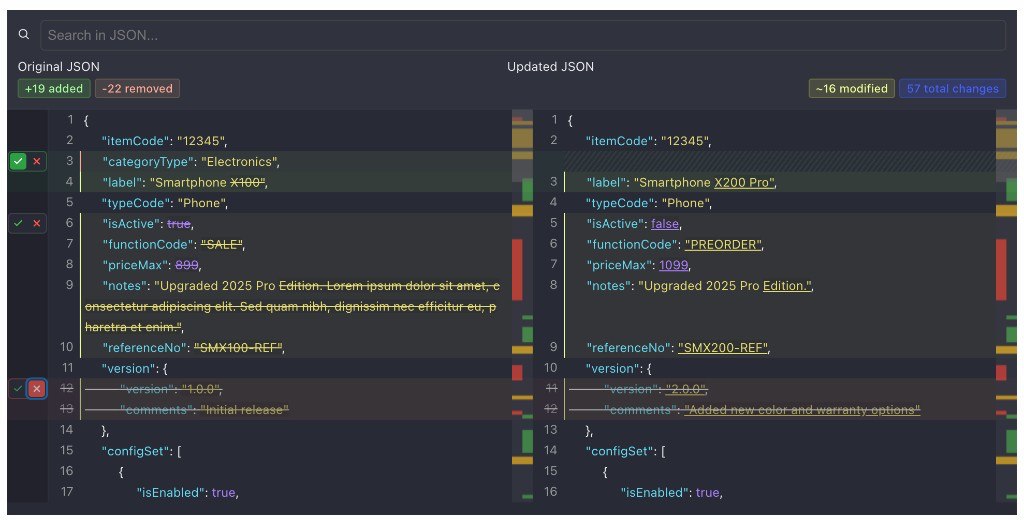
Large JSON diffs are hard to resolve, not just to view. Review mode turns the viewer into a selective merge UI:
- Enable
reviewMode— each change block gets accept / reject controls in the left gutter - Accept a block to take the right (new) side; reject or leave pending to keep the left (old) side
- Listen to
onReviewChangefor{ reviewStates, mergedJson }and use the merged object in your app
Change blocks are consecutive hunks (for example a whole nested object), not arbitrary single lines — so accepting/rejecting keeps valid JSON structure.
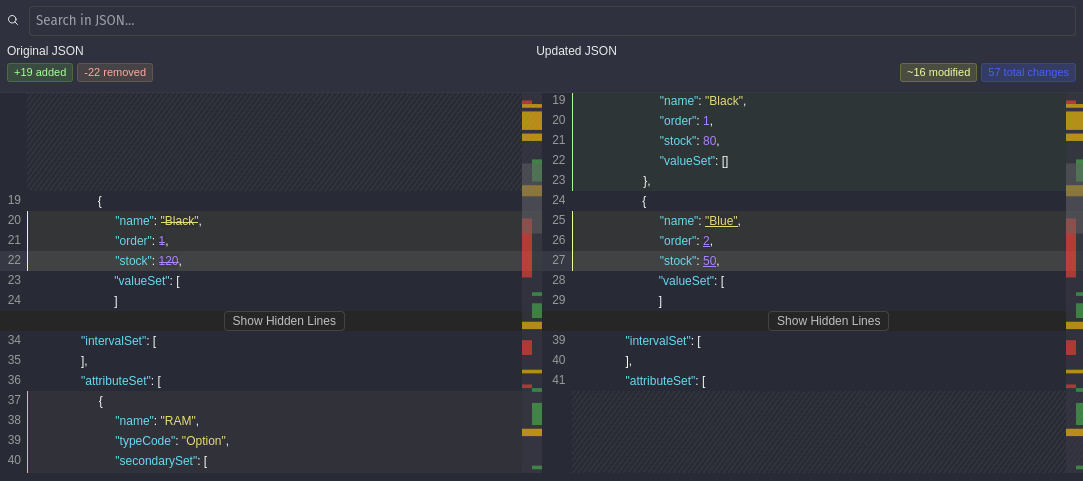
Unchanged stretches of the tree are collapsed by default so you can scan real edits quickly. Click Show Hidden Lines on a collapsed row, or drive expand/collapse from the ref API (expandPath, expandAll, collapseAll).
Because rendering is virtualized, expanding a large equal region does not mount the entire JSON into the DOM — only the rows in (and near) the viewport are rendered. That is what keeps expand/collapse usable on tens of thousands of lines.
npm install virtual-react-json-diff
# or
yarn add virtual-react-json-diff
# or
pnpm add virtual-react-json-diffimport { VirtualDiffViewer } from "virtual-react-json-diff";
const oldData = { name: "Alice", age: 25 };
const newData = { name: "Alice", age: 26, city: "NYC" };
export default function App() {
return (
<VirtualDiffViewer
oldValue={oldData}
newValue={newData}
height={600}
showLineCount={true}
showObjectCountStats={false}
/>
);
}The viewer exposes two different configuration layers, each serving a distinct purpose.
differOptions→ Controls how the diff is generatedcomparisonOptions→ Controls what is compared and how values are matched
These options are passed directly to the underlying diff engine.
Use them to:
- Choose how arrays are compared (
compare-key, positional, etc.) - Define comparison keys for object arrays
- Control depth, circular detection, and modification behavior
differOptions={{
  arrayDiffMethod: "compare-key",
  compareKey: "id",
  maxDepth: 999
}}These options affect comparison behavior without changing the diff structure.
Use them to:
- Ignore volatile fields (timestamps, metadata)
- Exclude specific paths
- Compare values across types
comparisonOptions={{
  ignoreKeys: ["updatedAt", "__typename"],
  ignorePaths: ["meta.timestamp"],
  compareStrategy: "type-aware"
}}<VirtualDiffViewer
oldValue={oldData}
newValue={newData}
differOptions={{
arrayDiffMethod: "compare-key",
compareKey: "id"
}}
comparisonOptions={{
ignoreKeys: ["updatedAt"],
compareStrategy: "type-aware"
}}
/>This separation keeps the diff engine flexible while allowing precise control over comparison behavior.
| Prop | Type | Description |
|---|---|---|
oldValue |
object |
Original JSON object (left side). |
newValue |
object |
Updated JSON object (right side). |
| Prop | Type | Default | Description |
|---|---|---|---|
height |
number |
— | Height of the diff viewer in pixels. |
leftTitle |
string |
— | Optional title shown above the left panel. |
rightTitle |
string |
— | Optional title shown above the right panel. |
className |
string |
— | Custom CSS class applied to the root container. |
| Prop | Type | Default | Description |
|---|---|---|---|
hideSearch |
boolean |
false |
Hides the search bar when set to true. |
searchTerm |
string |
"" |
Initial search term to highlight in the diff. |
onSearchMatch |
(index: number) => void |
— | Callback fired when a search match is found. |
showSingleMinimap |
boolean |
false |
Show a single minimap instead of dual minimaps. |
miniMapWidth |
number |
40 |
Width of each minimap in pixels. |
| Prop | Type | Default | Description |
|---|---|---|---|
showLineCount |
boolean |
false |
Display added, removed, and modified line counts. |
showObjectCountStats |
boolean |
false |
Display object-level stats (requires compare-key array diffing). |
Note:
showObjectCountStatsonly works whendifferOptions.arrayDiffMethod = "compare-key"andcompareKeyis provided.
| Prop | Type | Default | Description |
|---|---|---|---|
differOptions |
DifferOptions |
Engine defaults | Controls how the diff is generated (arrays, depth, keys). |
comparisonOptions |
DiffComparisonOptions |
— | Controls what is compared and how values match. |
inlineDiffOptions |
InlineDiffOptions |
{ mode: "char" } |
Fine-tune inline diff rendering behavior. |
| Prop | Type | Default | Description |
|---|---|---|---|
getDiffData |
(diffData: [DiffResult[], DiffResult[]]) => void |
— | Access raw diff results for custom processing or analytics. |
Review mode is for resolving a diff, not only displaying it — think selective merge for JSON configs, CMS payloads, or migration previews.
Accept/reject operates on change blocks (consecutive diff hunks), not individual lines. Pending and rejected blocks keep the left (old) side; accepted blocks take the right (new) side. The merged object is rebuilt with trailing-comma normalization so the result stays valid JSON.
| Prop | Type | Default | Description |
|---|---|---|---|
reviewMode |
boolean |
false |
Enables accept/reject UI and review keyboard shortcuts. |
onAcceptChange |
(change: ChangeBlock) => void |
— | Fired when a single change block is accepted. |
onRejectChange |
(change: ChangeBlock) => void |
— | Fired when a single change block is rejected. |
onReviewChange |
(state: { reviewStates: Record<string, ReviewState>; mergedJson: any }) => void |
— | Fired whenever review state or merged JSON updates. |
reviewClassNames |
{ accepted?: string; rejected?: string; pending?: string } |
— | Optional custom class names for review row states. |
import { useRef, useState } from "react";
import {
  VirtualDiffViewer,
  type VirtualDiffViewerRef,
} from "virtual-react-json-diff";

function ReviewExample({ oldData, newData }) {
  const viewerRef = useRef<VirtualDiffViewerRef>(null);
  const [mergedJson, setMergedJson] = useState(null);

  return (
    <>
      <button onClick={() => viewerRef.current?.previousChange()}>Prev</button>
      <button onClick={() => viewerRef.current?.nextChange()}>Next</button>
      <button onClick={() => viewerRef.current?.acceptAll()}>Accept all</button>
      <button onClick={() => viewerRef.current?.rejectAll()}>Reject all</button>

      <VirtualDiffViewer
        ref={viewerRef}
        oldValue={oldData}
        newValue={newData}
        height={600}
        reviewMode
        onReviewChange={({ mergedJson }) => setMergedJson(mergedJson)}
      />

      <pre>{JSON.stringify(mergedJson, null, 2)}</pre>
    </>
  );
}| Method | Returns | Description |
|---|---|---|
nextChange() |
ChangeBlock | null |
Select and scroll to the next change block. |
previousChange() |
ChangeBlock | null |
Select and scroll to the previous change block. |
scrollToChange(i) |
void |
Jump to change block at index i. |
scrollToPath(path) |
boolean |
Expand collapsed segments if needed, then scroll to a JSON path. |
expandPath(path) |
boolean |
Expand the collapsed equal segment that contains path. |
collapsePath(path) |
boolean |
Collapse the equal segment that contains path. |
expandAll() |
void |
Expand all collapsed equal segments (still virtualized). |
collapseAll() |
void |
Collapse all equal segments back to compact form. |
getCurrentChange() |
ChangeBlock | null |
Return the currently selected change block. |
acceptAll() |
void |
Accept every change block (review mode). |
rejectAll() |
void |
Reject every change block (review mode). |
Focus the viewer container first (tabIndex is set on the root).
| Key | Action |
|---|---|
ArrowDown / j |
Next change |
ArrowUp / k |
Previous change |
Enter / a (review mode) |
Accept current change |
Escape / r (review mode) |
Reject current change |
The component exposes a root container with class diff-viewer-container. You can pass your own class name via the className prop to apply custom themes.
Built on top of the awesome json-diff-kit.
MIT © Utku Akyüz
Pull requests, suggestions, and issues are welcome!